Fullstack MERN Blog App
Notes from the COMP3011 Web App Frameworks assignment 3.
Overview
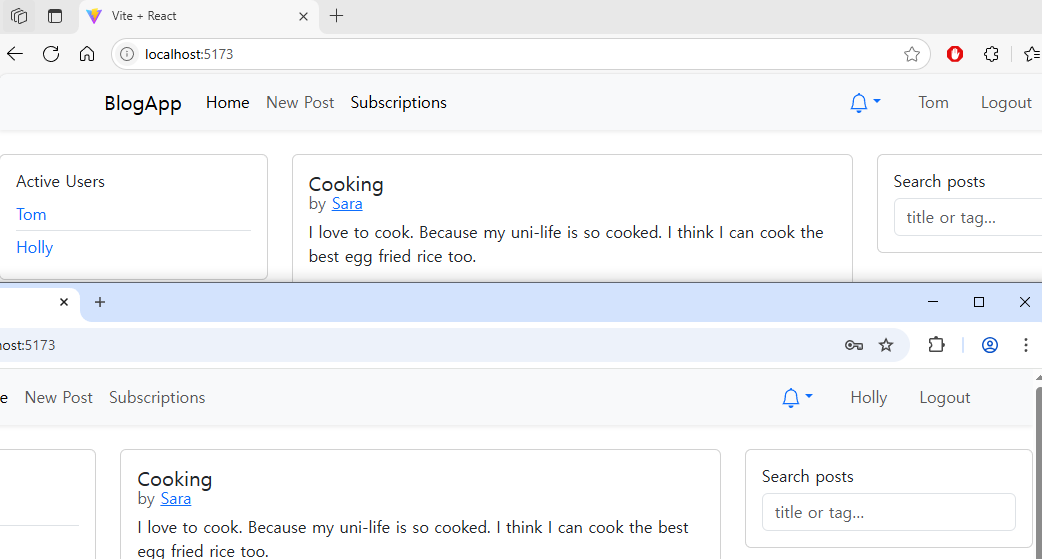
This is a full-stack blog management system built with a Node.js and Express backend, a MongoDB database, and a React.js single-page application frontend. This project was upgraded from a previous blog app, server-side rendered Pug application to a client-side rendered React application to implement a real-time notification system using Socket.io.
Tech Stack
- Backend: Node.js, Express, Socket.io, Passport.js, Joi, Bcrypt
- Frontend: React.js, Vite, React-Bootstrap, Socket.io-client, Axios
- Database: MongoDB with Mongoose
Thought process and approach
The primary goal was to upgrade a classic server-side rendered application into a modern, interactive, and real-time MERN stack Single-Page Application (SPA). The approach was centered on creating a clean separation between the backend API and the client-side React UI, while integrating a real-time layer for a dynamic user experience.
-
Frontend Architecture: Migrating to a React SPA
I decided to completely decouple the frontend from the backend, creating a pure client-side application with React. This approach allows for a faster, more fluid user experience without full-page reloads. I used Vite for the build tooling and React-Bootstrap for a responsive component library. The core routing was handled by React Router, with all routes defined infrontend/src/App.jsx. - Component-Based Design
To ensure the frontend was maintainable and scalable, I adopted a component-based architecture.- Page Components (
frontend/src/pages/): Each component, likeHome.jsxorPostDetail.jsx, corresponds to a specific route. - Reusable UI Components (
frontend/src/components/): Components likeNavigationBar.jsxandPostCard.jsxwere designed to be reusable across different pages, promoting consistency and reducing code duplication.
- Page Components (
- State Management Strategy with React Context
Different types of state required different management strategies:- Local State: Managed with
useStatefor component-specific data like form inputs (e.g., inLogin.jsxandPostEditor.jsx). - Global State: Managed with React Context API:
AuthContext– Tracks login state and persists session info inlocalStorage.NotificationContext– Handles real-time notifications.PresenceContext– Manages currently online users.
- Local State: Managed with
- Real-Time Integration with Socket.IO
A key requirement was real-time functionality. I implemented a centralized Socket.IO module on both the frontend and backend.- Backend (
backend/sockets/index.js): Authenticates socket connections with Express sessions. Tracks active user connections usingsocketsByUserto support multiple tabs and manage the “Active Users” feature. - Frontend: A single socket instance is created in
frontend/src/services/socket.jsand shared viaSocketContext.
- Backend (
- Data Flow and API Communication
REST API communication is centralized throughfrontend/src/services/api.jsusing Axios. Pages fetch backend data viauseEffect, store in localuseState, and re-render accordingly.
Key Learnings
React Hooks (useState, useEffect, useContext)
This project solidified my understanding of core React Hooks:
useStatefor local stateuseEffectfor API calls and socket subscriptionsuseContextfor consuming global contexts likeAuthContextandPresenceContext
I also created a custom hook useAuth for reusing auth logic easily.
SPA Routing with React Router
Defined the full routing structure in App.jsx. I created a PrivateRoute component to protect routes (e.g., /new, /subscriptions) based on login state via AuthContext.
Full-Stack State Synchronization
Learned to synchronize state between the frontend (localStorage, Context), and backend (Express sessions in MongoDB). Used Socket.IO to broadcast session updates across tabs for real-time syncing.
Real-Time Communication with Socket.IO
Built a real-time system by:
- Authenticating socket connections
- Broadcasting updates (
io.emit) - Reacting to events on the frontend (
socket.on)
This powered both the live notification system and active user list.
Component-Based Architecture
Migrating from Pug templates to React taught me the power of reusable components. By modularizing the UI into units like PostCard.jsx and NavigationBar.jsx, development became faster and cleaner. Integrating React-Bootstrap further streamlined styling and layout.
Reflection
This full-stack React blog app was a very challenging yet rewarding project due to its scale and complexity. While I had previous experience with Django and simple Node.js applications using Pug templates, this project required a much deeper understanding of full-stack development. I had to manage extensive API integration between the frontend and backend and master core React concepts such as props, parent-child component relationships, and Hooks.
As a computer science student, I believe selecting this as an elective unit was an excellent choice, even though it is not one of my core subjects. I really enjoyed the entire learning journey. The professor’s teaching style was particularly effective, instead of simply reading from lecture slides, he fostered a communicative environment and made a dedicated effort to ensure every student understood the fundamental concepts.
Building this application gave me a profound appreciation for why development work is often separated into specialized roles like frontend and backend. I now understand that as a web service grows in scale, managing the entire stack alone becomes incredibly difficult. This project highlighted the importance of a modular and separated architecture for maintainability.
While I recognize there’s still much more to learn about React and other industry-standard frameworks, this experience has given me a strong foundation in modern web application architecture. It has been a valuable milestone in my growth as a developer.
Extra notes RESTful APIs
REST (Representational State Transfer) is an architectural style used for designing networked applications, especially web services. RESTful web services are:
- Highly scalable
- Lightweight
- Easy to maintain
They are commonly used to build APIs for web-based applications.
HTTP Methods in REST
In RESTful services, HTTP provides several methods to manipulate resources. The most commonly used methods for data creation and modification are:
POST
- Purpose: To submit a new entity to a resource.
- Use Case: Creating a new resource under a collection.
- Effect: May result in a new resource being created, or the server performing some action.
PUT
- Purpose: To update a resource, or create it if it does not exist.
- Use Case: Full replacement of a resource at a specific URL.
- Effect: If the resource exists, it is replaced; if not, a new one is created.
PATCH
- Purpose: To partially update a resource.
- Use Case: Modify only specific fields of a resource without replacing the entire object.
- Effect: Applies a partial change to the resource.
Summary Table
| Method | Purpose | Creates Resource | Updates Resource | Partial Update |
|---|---|---|---|---|
| POST | Submit new data | ✅ | ❌ | ❌ |
| PUT | Create or replace | ✅ | ✅ (full) | ❌ |
| PATCH | Update part of data | ❌ | ✅ (partial) | ✅ |
Leave a comment