Django-based Task Manager
Notes from the COMP3011 Web App Frameworks assignment 1.
Overview
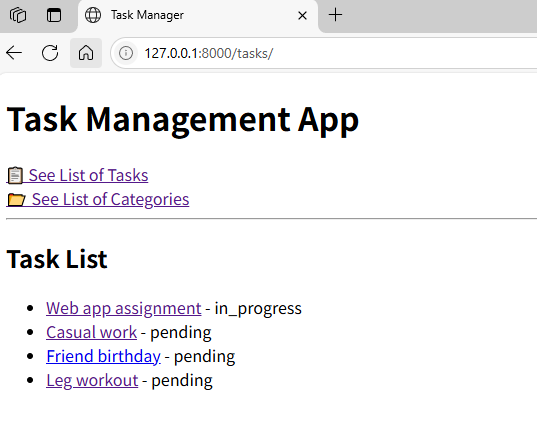
This assignment involved building a Django-based Task Management System. It allowed users to manage tasks and categories through a structured web interface. It was my first web development experience, and I found Django to be a simple yet powerful framework, which made the development process intuitive and enjoyable.
Thought Process and Approach
1. Django Project Setup
- Created a Django project named
task_manager. - Created an app named
tasks_app.
2. Models and Database Integration
Defined the following models in models.py:
Task Model
title: A short name for the task (CharField,max_length=255).description: A detailed description (TextField).due_date: Task deadline (DateField).status: Task progress (choices: Pending, In Progress, Completed).priority: Urgency level (choices: Low, Medium, High).
Category Model
name: Category name (CharField,max_length=100).description: Optional field for details (TextField, optional).
A ForeignKey relationship was defined from Task to Category (one category can have many tasks).
3. Admin Interface
- Registered
TaskandCategorymodels inadmin.py. - Created a superuser to manage data via Django’s built-in admin panel.
4. Views and URL Mapping
Implemented the following views in views.py:
task_list(): Displays all tasks.task_detail(task_id): Displays details of a specific task.category_list(): Displays all categories (read-only).category_tasks(category_id): Displays tasks in a selected category.
Mapped URLs in urls.py accordingly.
5. Templates and Frontend
Created reusable templates in the templates directory:
base.html: A common layout with navigation.task_list.html: Shows all tasks.task_detail.html: Shows task-specific details.category_list.html: Lists all categories.category_tasks.html: Lists tasks within a category.
Used Django’s template language to render dynamic content ({% for %}, {{ variable }}).
Key Learnings
- Django’s admin panel is incredibly useful for rapid prototyping and managing backend data.
- URL routing and template rendering in Django made it simple to display and interact with dynamic content.
- Using the MVT (Model-View-Template) architecture gave me a strong understanding of how full-stack web frameworks work.
- I learned to map views with parameters, manage templates, and structure a web application from scratch.
Reflection
This project was an exciting and rewarding first step into web development. I had never built a web app before, but Django made the experience accessible and enjoyable. I particularly appreciated how much functionality comes “out-of-the-box” with Django—admin panels, routing, templating, and database integration were all straightforward to set up.
The experience gave me confidence to further explore web development and backend systems. I’m now motivated to dive deeper into Django, REST APIs, and eventually frontend frameworks like React.
Leave a comment